


AI can now draft an email, summarize a report or plan a trip in seconds. It can also clone the voice of someone you love from a few seconds of video posted online. The FBI’s latest numbers show how quickly scammers have put it to work.
First, the numbers:
- AI is now its own category. In 2025, the FBI’s Internet Crime Complaint Center received more than 22,000 complaints involving AI, with reported losses of about $893 million. It was the first year the report tracked AI separately.
- Older Americans are the biggest target. People 60 and older filed 201,266 complaints and reported $7.7 billion in losses, up 59% in a single year. That works out to more than $38,000 per victim.
- Investment and “tech support” scams lead. Investment fraud accounted for $3.5 billion of those losses, and fake tech support scams for another $1 billion.
And those are only the cases people reported.
Our take in brief:
The technology is new, but the playbook isn’t. Nearly every scam still combines three things: urgency (“right now”), secrecy (“don’t tell anyone”) and a request for money or information. The best defenses are refreshingly low-tech, and a close relationship with your advisor is one of the strongest protections there is. We know your voice, your habits and your plans, and we notice when something doesn’t fit.
How AI is changing familiar scams:
- The voice clone. A few seconds of audio from a social media video can be enough to mimic someone’s voice. The call goes something like: “Grandma, I’m in trouble. Please don’t tell Mom. I need money right now.”
- The deepfake video. Scammers can appear on screen as someone you trust, from a celebrity promoting a can’t-miss investment to a “bank official” walking you through how to “protect” your account.
- The flawless phishing email. Spelling mistakes used to be a giveaway. AI has largely eliminated them, and today’s fake emails from your “custodian” can look exactly like the real thing.
- The fake support rep. A call or text warns of fraud on your account and urges you to move money to a “safe” account or read back a code they just sent you.
A real example from our office:
Not long ago, a client emailed asking us to send money to a different bank account for a gift for his wife. The request came as a reply to an email I had sent him, and he’d made a similar request before for a surprise birthday trip, so everything about it looked normal. We called him anyway. His email had been hacked, and he never sent that message.
That call is a firm rule, not a judgment call.
- We will always call you to confirm any request to move money that arrives by email, report suspicious activity to your custodian right away and work with them to lock down your account.
- We will never ask for your password or a verification code, pressure you to move money in a hurry or change where your money is sent based on an email alone.
- If something feels off, you can call anyone on our team.
Simple defenses that work:
- Pick a family safe word. Choose something memorable but random that has never been posted online. If an “emergency” call comes in, ask for it. A cloned voice can’t know a secret it never heard.
- Hang up and call back. Use a number you already have, not the one that just called you. Caller ID can be faked.
- Guard your verification codes. Firms often text a code to confirm it’s really you, and that’s normal. Only share a code when you started the contact, by logging in yourself or calling a number you know is real. If someone reaches out of the blue and asks you to read back a code, hang up.
- Slow down. A real emergency can survive the five minutes it takes to verify. Scammers count on you not taking them.
- Lock the doors. Use two-factor authentication (an authenticator app is best), a unique password for every financial account and alerts for logins and withdrawals. A free credit freeze at all three credit bureaus adds another lock.
- Think before you post. Consider making social media accounts private, especially videos where your voice or your family’s voices are easy to grab.
If something does slip through, here’s what protects you:
There are two very different risks, and each has its own safety net:
- Someone gets into your account without permission. This is cyber fraud or identity theft.
- The brokerage firm itself runs into financial trouble. This is rare, but it’s the other worry people have.
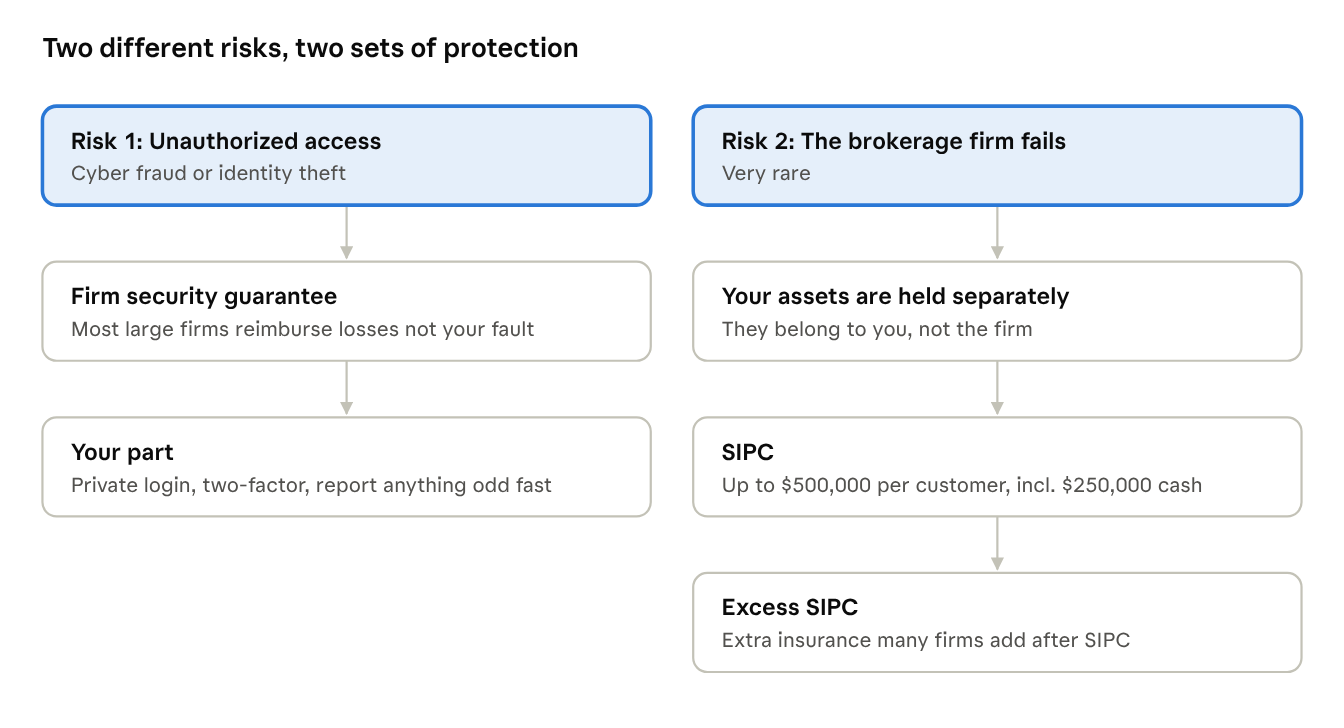
Neither protects against market losses. They keep your assets from going missing, not from going down in value.
If someone gets into your account:
Most large brokerage firms reimburse losses from unauthorized account access, as long as it happened through no fault of your own. We hold most client accounts at Fidelity, and we also use Charles Schwab and Interactive Brokers. Fidelity’s version is its Customer Protection Guarantee.
“No fault of your own” usually means you did your part:
- Keep your login private. If you share it with anyone, even a family member, their activity counts as authorized by you and isn’t covered.
- Review statements and alerts regularly and report anything unusual to your firm’s fraud line right away.
- Keep your phone number and email current so the firm can reach you if something looks wrong.
We’re often asked whether splitting accounts between firms helps, and the answer is: not really. Most large firms offer a similar guarantee, and more firms means more logins to protect. Strong security habits matter more than where your account is held.
If a brokerage firm fails:
- Your investments are kept separate. By law, firms must hold client assets apart from their own money. If a firm went out of business, your investments would not be used to pay its debts, and in most cases they would simply move to another firm.
- SIPC is a backstop. If a firm fails and client assets are missing, the Securities Investor Protection Corporation covers up to $500,000 per customer, including up to $250,000 in cash.
- Excess SIPC adds another layer. Many large firms buy private insurance that applies after SIPC is used up. Fidelity’s coverage, through Lloyd’s of London and other insurers, has a $1 billion total limit across all customers, with no per-customer limit on securities and a $1.9 million per-customer limit on cash awaiting investment.
Your 5-minute security checklist:
☐ Choose a family safe word, and tell everyone who might call you in an emergency
☐ Turn on two-factor authentication, ideally with an authenticator app
☐ Use a unique password for every financial account
☐ Turn on account alerts for logins and withdrawals
☐ Save your advisor’s and custodian’s real phone numbers in your contacts
☐ Consider a free credit freeze at all three credit bureaus
☐ If you’re targeted, report it at ReportFraud.ftc.gov and ic3.gov
Want a hand? Give us a call. Whether you’re a client or comparing firms, we’re happy to help you set up two-factor authentication, talk through a family safe-word plan or double-check anything that feels a little off.
This article is for general informational and educational purposes only. Nothing on it is investment, tax, legal, or accounting advice. Please consult a qualified professional before acting on any information here. Security guarantees and insurance coverage vary by firm and may change. Fidelity and SIPC details are current as of November 2026 and are believed to be reliable as of the date of publication. Baker Ellis Asset Management LLC does not guarantee the accuracy of the article, and it may not be updated. Reading this article does not create an advisory relationship.